 Search
 Contact
Microsoft 365 Security in 2026: Identity, Configuration and Recoverability
Microsoft 365 Security 2026
If your Microsoft 365 tenant is not secure, your business is not secure.
Microsoft 365 is no longer just email. It is your collaboration platform, document management system, identity provider, communication layer, and critically, the gateway into the rest of your IT estate.
While Microsoft provides powerful security capabilities within Microsoft 365, those tools do not automatically protect you. Configuration, governance, monitoring, identity controls and recovery planning all play a critical role. This is where risk quietly builds.

The Challenges Businesses Face
Most organisations do not intentionally neglect security. Gaps emerge gradually.
- “Set and Forget” Configuration: Microsoft 365 is often deployed during a migration project, configured once, and then left alone. But security is not static, threats evolve, features change and best practice advances. What was considered secure three years ago may now expose you unnecessarily.
- Identity Is the New Perimeter: With remote and hybrid working now standard, identity has replaced the traditional network boundary. If identity controls are weak, with poorly enforced MFA, legacy authentication still enabled, and inconsistent Conditional Access rules, attackers do not need to breach your firewall. They simply log in. Compromised accounts remain one of the most common and damaging entry points for attackers.
- Security Tools Exist, But Aren’t Optimised: Many organisations already own advanced security capabilities within their licences (E3, E5, Business Premium). However, we often see policies that are partially configured or left inactive, alerts generated but not actively monitored, and security features enabled but not tuned. Reporting is usually not being reviewed at the leadership level. The tooling exists, but operational maturity often does not.
- No Clear Ownership: Who truly owns Microsoft 365 security? IT? Security? An external partner? Senior leadership? In organisations without a dedicated CTO or CISO, responsibility can become fragmented. When ownership is unclear, risk accumulates quietly in the background.
Microsoft 365 Security Best Practices and Non-Negotiables in 2026
Certain controls should now be considered foundational.
Strong Multi-Factor Authentication (MFA) for all users – that includes the VIPs
Conditional Access policies aligned to risk and device compliance
Strict protection and governance of privileged accounts
Just in time audited access for privileged roles through Azure PIM
Integration with endpoint security and threat detection tools
Controlled, monitored and audited external sharing
Regular review of Secure Score and configuration drift
These are baseline protections. Without them, exposure increases significantly. But even strong preventative controls do not eliminate risk entirely.
Which brings us to one of the most overlooked areas of Microsoft 365 security.
M365 Backup & Recovery: The Critical Layer Many Overlook
One of the most dangerous assumptions we encounter is: “It’s in the cloud, so it’s backed up.”
While Microsoft ensures platform availability, it operates under a shared responsibility model. That means your organisation remains responsible for protecting and recovering its own data. Understanding the Microsoft 365 shared responsibility model is essential when designing a secure and recoverable tenant architecture.
Microsoft is responsible for the availability of the service; you are responsible for the integrity, retention and recoverability of your data.
It is also critical to understand that data loss does not only come from cyber-attacks.
The Real-World Risks to Microsoft 365 Data
None of these scenarios is an exotic cyber-attack. They’re ordinary business events that become serious problems when recoverability isn’t designed properly.
- Accidental user deletion: A finance manager permanently deletes a mailbox folder they think is obsolete email clutter, which contains active supplier negotiations needed the following week. Recycle bin retention has already expired.
- Malicious insider activity: A departing employee bulk downloads customer data, then deletes key project documentation from SharePoint before their access is removed. No independent backup. And no clear audit review process in place.
- Ransomware encrypts synced SharePoint or OneDrive data: Malware encrypts a user’s laptop. Synced OneDrive files overwrite clean cloud copies, impacting multiple shared folders. Finance and operations data becomes unreadable almost immediately.
- Compromised accounts deleting content: An attacker logs in using reused credentials, creates hidden inbox rules, and quietly deletes mailbox and SharePoint data before detection. By the time unusual login activity is noticed, data is already gone.
- Retention policies misconfigured: A retention policy intended for short-term data is accidentally applied tenant-wide, automatically purging critical records months later. The configuration works exactly as designed, just incorrectly scoped.
- Compliance-driven recovery requirements: A regulatory audit requests access to historical communications relating to a contract signed four years ago. The business assumed retention covered it. The data is no longer available. This is now a governance issue.
- Departed employee data is later required for legal reasons – A senior employee’s mailbox is deleted after departure. Six months later, a legal dispute arises, and the business needs access to historic emails and Teams chats, but the account and data are gone.
Why Backup Is a Security Control
Backup and recovery is not simply an IT housekeeping task. It is:
- A ransomware resilience mechanism
- A business continuity safeguard
- A compliance protection layer
- A reputational risk mitigator
Without a tested restore capability, recovery during an incident becomes uncertain — and uncertainty during a crisis is expensive.
Every organisation should be able to answer confidently:
- How quickly can we restore a deleted mailbox?
- Can we recover an entire SharePoint site?
- Are backups monitored daily?
- Have we tested a restore recently?
- Do we know our recovery time objectives?
If the answer to any of these is unclear, that’s a risk exposure.
Common Gaps We Regularly See
Even in otherwise mature environments, patterns appear:
- Legacy authentication is still enabled
- Global admin accounts are used daily
- Inconsistent MFA enforcement
- No review of mailbox forwarding rules
- Shadow IT through unmanaged SaaS integrations
- Security alerts are not actively triaged
- No board-level visibility of security posture or public attack surface
- Backup assumed but not independently verified
- Restore capability never tested
The most concerning issue? Many organisations don’t actually know how secure they are. There is often a perception of security rather than measurable clarity.
Do You Need a Microsoft 365 Security Assessment?
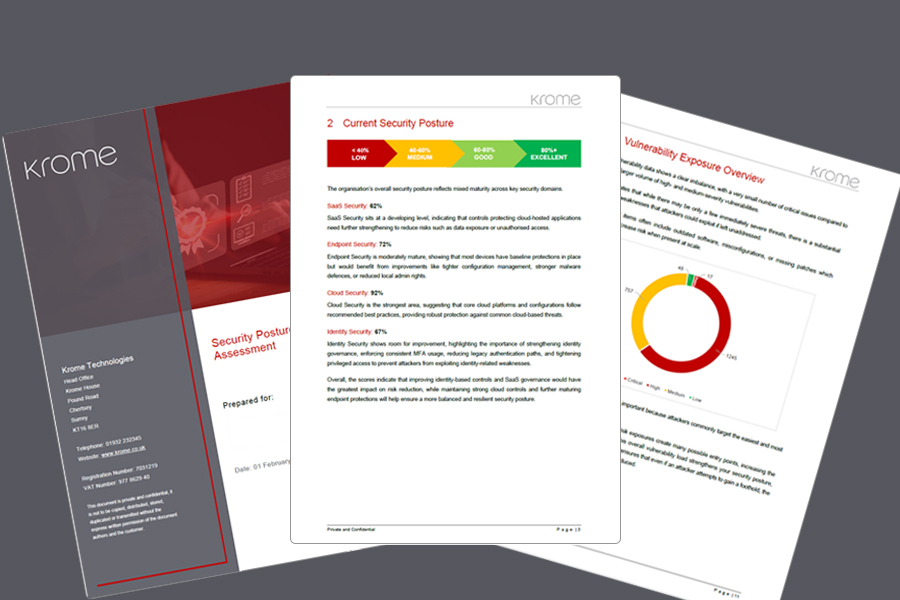
Most organisations believe they are “reasonably secure,” but very few have benchmarked themselves against current best practice, properly assessed identity exposure, evaluated their external attack surface, validated backup and recovery readiness, or reviewed their security posture at a board level.
We can offer you a high-level Microsoft 365 Security Assessment, free of charge. This advisory-led assessment gives you a clear, independent view of your Microsoft 365 security posture, highlighting high-risk exposures across identity, access, and your external attack surface. You’ll receive prioritised, risk-ranked recommendations, from quick wins through to strategic improvements, along with an executive-ready summary for board-level discussion.
It’s a straightforward, low-risk way to understand how your tenant aligns with current best practices and where to focus next. For more information, please click the link below or contact us on 01932 232345.
Customer Success

Download our PDF Brochure
Download a full overview of our services and the benefits of working with Krome.
About the Authors

Dee Mager
Chief Marketing Officer
With 27+ years of IT channel marketing experience, Dee leads the marketing strategy at Krome Technologies working closely with Krome’s Microsoft, Sec…
More from Dee Mager →
Paul Edwards
Head of Security Operations Centre
Paul has been with Krome for 12 years and played a leading role in designing and building our Security Operations Centre service. As Head of SOC, he …
More from Paul Edwards →Want to know more?
Contact us today to explore how our tailored solutions can align with your business priorities.
Related Insight & Resources

Secure Enough to Innovate? Finding the Right Balance Between Security and Innovation
Rather than asking "How do we stop this?" Security teams should ask "How do we enable this safely?"
Tech IT Out: Taking Control of Shadow AI
In this episode we discuss the implications of Shadow AI in your organisation.
Tech IT Out: Backup, DR & BCP Explained
In this episode we discuss essential steps in Backup DR and Business Continuity planning